The Hook — A Macro Layer Shipped at $0
If you've been copy-pasting the same AI prompts every day, that era is over.
On April 14, 2026, Google shipped Skills inside Chrome's Gemini sidebar. The core idea, in one sentence: save a prompt once, and rerun it on any webpage with a single forward slash.
Price tag? Zero. Sign in with a Google account and it works on desktop Chrome. No separate subscription, no Gemini Advanced required.
What It Is — A Prompt Macro Layer Built Into the Browser
Skills has three things competitors don't:
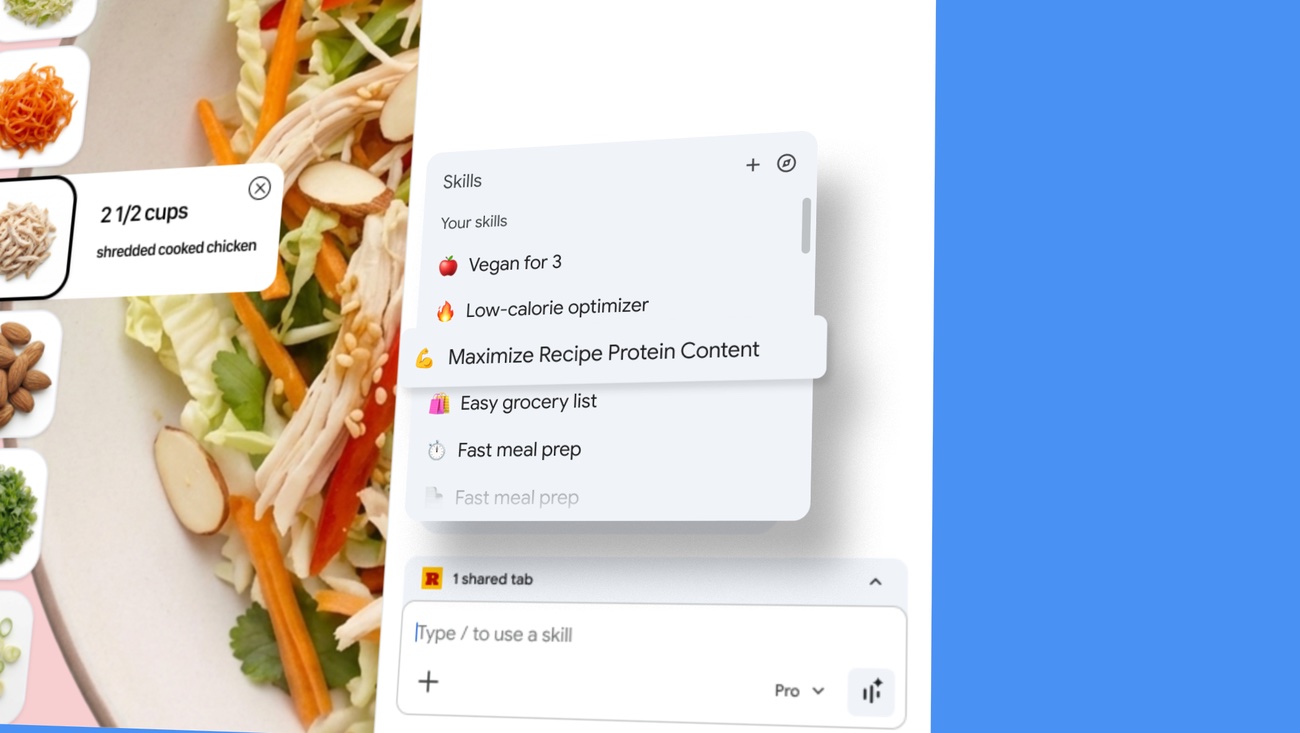
First, automatic page-context injection. The webpage you're viewing – plus any other tabs you select – is passed as context when a Skill runs. You don't retype "summarize this page" every time.
Second, cross-device sync. Save a Skill once and it's available on any signed-in Chrome desktop – Mac, Windows, ChromeOS.
Third, a prebuilt Skills library. Google ships ready-to-use Skills for productivity, shopping, recipes, and budgeting. Users who don't know prompt engineering can still trigger "protein macro calculator" with a click.
 Source: blog.google · press image, news citation
Core Specs — What Makes It Different from Other Browser AI
Side by side, the positioning gets sharp.
| Browser | AI feature | Save prompts | Multi-tab context | Trigger model | Underlying model |
|---|---|---|---|---|---|
| Chrome | Gemini + Skills | Yes (slash/plus) | Yes (tab picker) | One-click | Gemini 2.5 Pro tier |
| Edge | Copilot | No | Partial | Conversational | GPT-4o tier |
| Arc | AI Summary | No | No (current tab) | Auto-summary | Undisclosed |
| Brave | Leo AI | No | No | Conversational | Llama-based |
Competitors stopped at "sidebar chat." Chrome went one abstraction level higher: reusable workflows. Excel macros, but for AI – and you don't have to write code.
Feature Breakdown
Feature 1 — Saving and Reusing a Skill
The flow is three steps:
- Open Gemini sidebar in Chrome and type a prompt as usual
- If the result is good, hit "Save as Skill" and give it a name
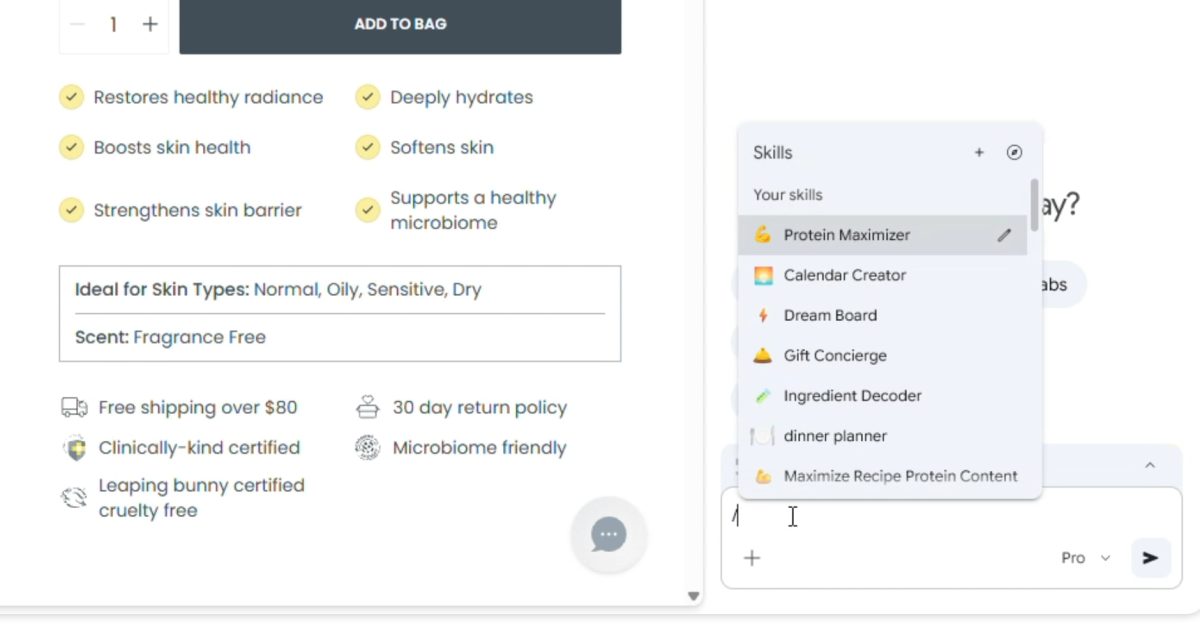
- On a future page, type
/or click+to invoke the saved Skill
At execution, the current tab's content becomes context. Pick additional tabs and Gemini analyzes multiple pages together. Open three recipe pages, run "nutrition comparison table," and get one unified table.
Feature 2 — Skills Library and Sensitive-Action Guardrails
Google's prebuilt library is organized into five categories:
- Productivity (document summaries, meeting notes)
- Shopping (product comparisons, review digests)
- Recipes (nutrition analysis, substitutions)
- Budgeting (expense categorization, saving tips)
- Research (cross-source fact-checking)
Library Skills are editable – fork and customize them as your own. The guardrail detail matters. Google stated that Skills performing external actions (sending email, adding calendar events) require user confirmation before execution. That's the defense against prompt-injection attacks that try to fire off arbitrary emails.
 Source: 9to5google.com · news citation
Pricing + Availability — When and Where
| Item | Detail |
|---|---|
| Price | Free (Google account required) |
| Launch date | April 14, 2026 |
| Platforms | Chrome desktop (Mac, Windows, ChromeOS) |
| Language | English (US) only at launch |
| Mobile | Not supported at launch |
| Gemini Advanced required | No. Works with free accounts |
| API access | None. Consumer Chrome feature only |
English-US is a prerequisite. Other languages will come via Google's usual phased rollout, but no dates were disclosed. Mobile Chrome is explicitly out of scope at launch.
Who It's For — Personas and Alternatives
The value splits across four personas.
| Persona | Value from Skills | Current alternative |
|---|---|---|
| Knowledge worker | Auto-summarize docs and reports | ChatGPT side tab, Notion AI |
| Researcher | Cross-compare multiple tabs | Perplexity, ChatGPT with Search |
| Shopper | Auto-generated spec comparison tables | Browser extensions |
| Non-dev power user | No-code AI workflow building | Zapier AI, Make.com |
The real gain is eliminating context-switching cost. The old flow was: open ChatGPT in a new tab, copy page content, paste, type the prompt. Four steps. Skills collapses it to one slash. That's 30–60 seconds saved per task. At 20 uses a day, you reclaim 10–20 minutes.
Competitive Response + Market Position
Microsoft Edge is iterating on Copilot with Pages (note-based workspaces) and Agents (multi-step tasks). The Browser Company (Arc's creator) pivoted to Dia, an AI-native browser, earlier this year. Perplexity shipped Comet, its own browser, blurring the line between search and browsing.
Distribution still favors Chrome. Per Statcounter's March 2026 data, Chrome holds roughly 66% of the global desktop browser share. Which means Skills is naturally distributed to hundreds of millions of users' default browser over the next few weeks. Competitors can build the same feature and still lose on distribution.
Google is absorbing work that used to belong to the Chrome extension ecosystem. AI automation extension builders should read this carefully.
What This Means for You
For general users: The habit of bouncing between ChatGPT and Chrome tabs likely dies for common tasks. Page summaries, product comparisons, nutrition analysis – Skills is faster and has less friction.
For developers: AI automation extensions (ChatGPT sidebar, Monica, Merlin) now compete directly with a native browser feature. Only extensions with real differentiation survive. Plain "prompt library" extensions should be treated as absorbed by Google.
For enterprise IT: Skills hasn't shipped detailed enterprise controls yet. Organizations with sensitive data need a policy on how browser-level AI features interact with their data. When action-taking Skills (email, calendar) spread, DLP (data loss prevention) policies will need a refresh.
References
- Google Blog: Turn your best AI prompts into one-click tools in Chrome
- TechCrunch: Google adds AI Skills to Chrome to help you save favorite workflows
- MacRumors: Gemini in Google Chrome Gets a Skills Library
- 9to5Google: Google announces 'Skills' for Gemini in Chrome
- SiliconANGLE: Google adds reusable prompts to Gemini in Chrome