
Design in Figma, Animate Elsewhere? That "Elsewhere" Just Disappeared
Here's the deal: Figma launched 'Figma Motion,' a native animation tool, in open beta at Config 2026 on June 24. Until now, designers drew screens (UI) in Figma, then jumped to a separate tool — After Effects, Principle, ProtoPie — to add animation. Design and motion lived in two worlds. Figma Motion erased that boundary: you can now build animation right on the canvas where you designed.
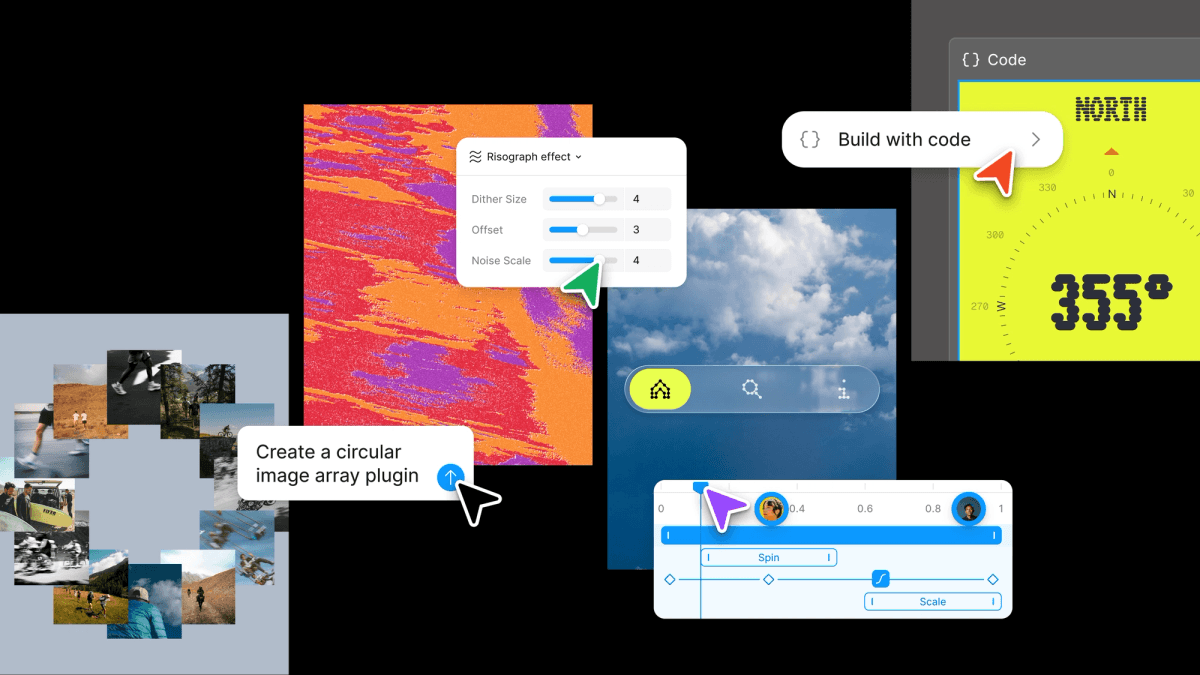
The workflow is intuitive. Toggle Motion mode and a timeline appears at the bottom of the canvas, where you set keyframes to build movement. Want it fast? Apply prebuilt preset animations. Want it precise? Tune natural movement yourself with bezier curves (easing) and spring physics. You finish motion in the same workspace you designed the UI in.
Output is flexible too. Export to MP4, GIF, WEBM, and animated SVG — and crucially, in Dev Mode it extracts directly to CSS, JSON, or React code. So a developer can take the designer's animation as code and implement it as-is. The "animation spec," always a headache in the design→dev handoff, gets auto-organized into code. As an open beta, it's rolling out gradually across all plans from June 24.
Here's what we'll unpack: what Motion changes, why Figma added it now, and what changes for designers, developers, and rival tools. Three players: Figma, the designers and developers most directly affected, and the dedicated motion tools at risk of losing market.
The Players — Figma, Designers/Developers, and Dedicated Motion Tools
First, Figma — effectively the standard for web-based collaborative design. Figma was strong at "UI design and prototyping" but weak at refined motion. Basic prototypes handled simple screen transitions, but keyframe-level fine animation leaned on external tools. Shipping Motion at Config 2026 fills that last gap, completing the picture of "the entire design process in one tool."
Next, designers and developers. Designers are freed from tool-switching friction — design, animate, and see results all flow in one place. Developers get easier handoff: instead of "explaining animation in words" or guessing from a video, they receive precise CSS/React code. The most ambiguous zone between design and dev becomes clear.
Third, dedicated motion tools — After Effects, Principle, ProtoPie, Rive. They held their ground doing "the refined motion Figma couldn't." But when Figma adds motion as a core feature, "just do simple stuff in Figma" erodes part of their market. Advanced video and character animation still favor dedicated tools, but they risk ceding the big chunk of "UI motion" to Figma.
One line: Figma fills design's last gap — motion — as a core feature, easing life for designers and developers while threatening dedicated motion tools' market. That's the spine.
What's New — What Landed
| Feature | Detail |
|---|---|
| Timeline | Keyframe timeline at bottom of canvas |
| Animation | Keyframes, presets, bezier easing, spring physics |
| Export | MP4, GIF, WEBM, animated SVG |
| Code extract | CSS, JSON, React in Dev Mode |
| Release | Open beta, gradual rollout across all plans (from 6/24) |
| Paid features | Publishing animated components, AI motion generation, high-res video need a paid Full seat |
Two things stand out. First, it shipped free in beta across all plans. Anyone can try basic keyframe animation and export. But advanced features — publishing animated components to a design system, AI-generating motion, exporting high-res video — need a paid Full seat. The classic "free taste, paid for serious use" adoption strategy.
Second, "it extracts to code" is the real differentiator. It doesn't stop at building animation inside Figma; it lets you pull that out as CSS/React for direct use in a real product. A fancy After Effects video always had to be "rebuilt" by a developer in code — Figma Motion removes that rework. Shrinking the distance between design and code is Figma's big picture, and shipping it alongside features like Code Layers at Config 2026 fits the same theme.
Who Wins
Figma steps closer to "owning the whole design process." When UI design → prototype → motion → code extraction all finish in one tool, designers have fewer reasons to leave Figma. Eliminating tool-switching is powerful lock-in. At the same time, it solved the universally painful "design-dev handoff," growing product value.
Designers gain productivity and expressiveness at once. Tool-switching friction vanishes, and design intent carries through to motion consistently. It's perfect for "UI micro-interactions" (button presses, card expansions) — overkill for After Effects, now handled right in Figma.
Developers benefit hugely on handoff. The era of guessing animation specs from videos or words ends; they get precise CSS/React code. Friction like "the design looks like this but the build differs" shrinks, and motion-implementation time drops. The most ambiguous zone of design-dev collaboration gets quantified.
Precedents — Wins and Misses
We've seen this before. Figma absorbing handoff with Dev Mode, and grabbing the whiteboard market with FigJam are the templates. Figma's strategy is consistent — absorb adjacent areas of the design workflow one by one as core features. Each time it took part of a dedicated tool's market (Zeplin, Miro). Motion is the same formula.
The key to the win is "good-enough integration." Even if not as refined as a dedicated tool, the convenience of "it works seamlessly in one place" beats the gap. Most UI motion is simple interaction, not fancy video. Handle that 80% in Figma and there's no reason to open a dedicated tool. A textbook case of "integration convenience" beating "perfection."
The failure risk is just as clear. If beta performance and stability don't hold up, it backfires. Motion lives on fine timing and smoothness; if the tool stutters or expression is limited, designers return to dedicated tools. And advanced video/character animation still belongs overwhelmingly to dedicated tools, so if Figma overreaches that boundary it risks becoming a "mediocre jack-of-all-trades."
The code-extraction angle is what makes Motion more than a feature checkbox, though. For years the design-to-engineering boundary leaked the most value precisely at motion: a beautiful prototype would degrade into "make it bounce a little" in a handoff doc, and developers would reinvent the timing by eye. If Figma Motion's CSS/React export is faithful enough to use — not just reference — it collapses a whole category of rework and miscommunication. That's a bigger deal than the animation tooling itself, because it attacks the seam between two job functions rather than just adding a capability inside one of them. Whether the exported code is production-grade or merely a starting point is the detail that determines how much of that promise lands.
Rival Counter-Plays
Adobe (After Effects) holds the deep moat of advanced video and VFX. Even ceding some UI micro-interactions to Figma, it remains dominant in film/ad-grade motion graphics. Expect Adobe to differentiate on "pro-grade advanced features" while strengthening AI motion in its own design tools.
Specialist interaction tools like Rive and ProtoPie defend their niche with "more refined, code-friendly motion than Figma." Rive especially is strong at runtime animation (interactive motion running live in apps), a different flavor from Figma's "design-stage motion." They draw their line at "deepening expertise."
Startups and new tools will bet on "AI-native motion generation" — describe it in text, get an animation. Figma added AI motion generation as a paid feature, but the area is early, so newcomers can probe gaps with bolder experiments.
So What Changes
If you're a designer — turn on the Figma Motion beta now and build the UI interactions you usually made in external tools right in Figma. Simple micro-interactions likely handle fine. But advanced video/character animation may still favor dedicated tools, so splitting tools by job type is realistic.
If you're a developer — pilot the flow of receiving designers' Figma Motion animations as CSS/React in Dev Mode. The ambiguity of animation handoff drops sharply. Whether to use the extracted code as-is or for reference depends on your project structure.
If you lead a design team — it's time to review your tool stack. If Figma Motion suffices, you can trim dedicated motion-tool licenses and save cost. But since it's beta, verify stability before deciding, and test thoroughly before depending on it for core work.
🥄 Three Things You're Probably Wondering
— Can I stop using After Effects now? It depends. Simple UI micro-interactions are likely well-covered by Figma Motion. But film/ad-grade motion graphics and complex character animation still belong overwhelmingly to dedicated tools like After Effects. Splitting by "weight of the job" is realistic.
— Is it free? Basic features are free to try in open beta on all plans. But advanced features — publishing animated components, AI motion generation, high-res video export — need a paid Full seat. It's "free taste, paid for serious use."
— Can I use the extracted code as-is? It varies by project. Extracting to CSS/React helps handoff a lot, but whether to use it as-is or for reference depends on your codebase structure and performance needs. Remember auto-generated code always needs review.
Sources
- What's new from Config 2026 — Figma Learn
- Figma Launches Code Layers & Motion at Config 2026 — CMSWire
- Figma Config 2026: Motion, Code Layers and AI Tools Explained — Magicshot
- Figma Finally Added Native Motion Design: A Full Guide — Medium
- Figma Config 2026: Code Layers, Motion, AI Agents Explained — Dragdropship
Numbers are as of announcement and may change.