The real problem was that nobody reviews what the agent wrote
Here's the deal: Slack announced Slack Code on August 21 — a way to pull AI coding agents directly into team channels.
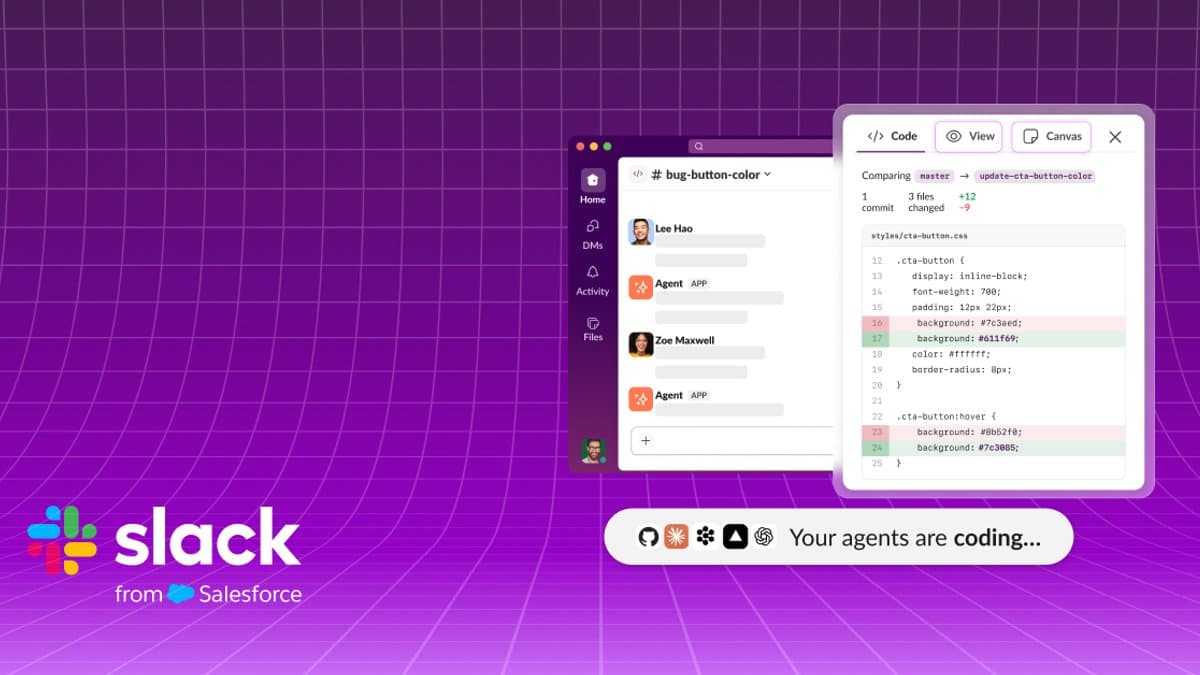
The mechanics are simple. Tag an agent mid-conversation and a dedicated project channel spins up instantly. While the agent works, everyone in that channel sees the same thing: code diffs of proposed changes, a live preview of HTML output, and the agent's running plan, all surfaced as tabs. Drop feedback and the agent incorporates it. Approve when it's done. When the work finishes, the channel archives as a searchable record.
Partners at launch are Anthropic's Claude Code, Cognition's Devin, GitHub Copilot, and Vercel's agent, with OpenAI's ChatGPT also named a founding partner. It's included on every Slack plan, though you still need your own access to each partner agent.
Read as a feature list, this looks like one more integration. But the problem it targets isn't a feature gap. It's that nobody is meaningfully reviewing the code AI writes.
The cast — the isolated terminal, and Slack's calculation
Most coding agents today run inside a terminal or IDE. Claude Code, Codex, Cursor. The upside is obvious: direct filesystem access, command execution, see the result, iterate. For one developer's throughput, there is no better arrangement.
The problem is everything after. Whatever the agent did for three hours lives only in that developer's scrollback. Teammates see a PR. Which judgment calls were made and why, which approaches were tried and abandoned — gone. Code review exists to ask "why is it written this way," and for agent-written code, there's nobody who can answer.
This is playing out in real organizations right now. PR volume is up; review depth is down. The moment a reviewer thinks "the AI probably wrote this," the approve button gets lighter. Some months later you have a codebase nobody understands.
That's the gap Slack went after. Move the agent's working process from a private terminal into a team channel and it becomes observable by default — visible without anyone deciding to share it.
The business calculation matters too. Slack is owned by Salesforce and sits structurally behind Microsoft Teams. Teams ships bundled with Office, Windows and Entra, with Copilot layered on top. Slack has no bundle, so it has to win as a standalone product.
The battlefield it picked is engineering collaboration — where its user base skews heavily, and where integrations with GitHub and Jira have long been a strength. Stack a new workflow on ground you already hold.
Including it on every plan reads the same way. Charging for it would generate revenue and slow adoption. What Slack needs right now isn't revenue; it's the habit that AI coding happens in Slack. Each agent's usage fees still go to the partner. Slack lays the surface; partners collect.
The partner lineup is worth examining. Claude Code, Devin, Copilot, Vercel and ChatGPT are direct competitors sitting side by side on the same surface. Slack signed no exclusive with any model company — consistent with Salesforce maintaining relationships across Anthropic and OpenAI. Neutrality is a position Microsoft can't easily copy; imagining Teams treating Copilot and Claude Code as equals is difficult.
Neutrality has a cost, though. Supporting many agents means matching each one's auth, permissions and output formats, and refreshing integrations whenever a partner changes its product. How long Slack sustains that maintenance determines this feature's lifespan. When integrations rot, users quietly go back to their original tools.
How it actually runs
| Step | What happens | Who sees it |
|---|---|---|
| 1. Tag | Call an agent mid-conversation | Original channel members |
| 2. Channel | Dedicated code channel auto-created | Invited teammates |
| 3. Work | Diff, preview and plan update as tabs | Everyone, live |
| 4. Steer | Comments get incorporated by the agent | Everyone |
| 5. Approve | Review output and sign off | Authorized approvers |
| 6. Archive | Channel persists as a searchable record | Everyone, later |
The most underrated step is 6. The rest has analogs elsewhere — IDEs show live diffs, deployment platforms show previews. But keeping the conversation about why the agent wrote it this way in a searchable form is something most tooling can't do.
That matters on a delay. When a bug surfaces in that code six months later, today you can trace back through git blame to a commit and a PR. Under Slack Code, the conversation and judgment from the moment the code was made persist too. Organizational memory gains a layer.
Step 4, mid-flight steering, is the third thing to watch. Most agent workflows today are request → wait → inspect. If the agent runs thirty minutes in the wrong direction, you find out at the end. Exposing plan and progress live lets you kill a bad direction early — a real saving in both tokens and time.
Step 3 is also the least certain. A channel streaming live diffs and plans carries a lot of information. An agent touching dozens of files turns the channel into a log stream fast. Whether a human can actually track that volume, or whether it becomes another notification nobody reads, will decide this product's practical worth. Observable and observed are not the same thing.
What each side gets
Engineering teams get observability. For a senior engineer or tech lead, there is currently almost no way to know what teammates are asking agents to do. Exposed in a channel, coaching becomes possible — "don't prompt it that way, ask it like this" — in real time.
Non-engineering roles get a path in. A PM or designer seeing an HTML preview and commenting "tighten that spacing" directly hasn't existed before; a developer had to translate in the middle, and that round trip took days. It cuts both ways, though. When everyone can weigh in on code work, decisions can slow down.
Onboarding benefits too. One thing junior developers have lost is visibility into how seniors reason. Pair programming and review comments used to teach that; agents in the middle blurred the path. Conversations between a senior and an agent, preserved in a channel, become a kind of teaching material. That's a side effect rather than the goal, but a real one.
Slack gets workflow lock-in. When something as high-frequency as coding happens inside Slack, leaving gets harder, and archived channels compound that value. For Salesforce, it's Slack moving from messenger to the place work actually happens.
Partner agent companies get distribution. For Anthropic, Cognition, GitHub and Vercel, Slack's enterprise base is a serious channel — especially for anyone chasing team-level adoption rather than individual developers. There's a price: they cede the user relationship to a layer they don't control. If agents become swappable parts inside Slack, differentiation pressure rises.
Vercel's participation is its own signal. Previews in a channel only work if deployment infrastructure sits underneath. Binding "write the code" to "see the result immediately" sharply expands what a non-coder can judge. Done well, people who can't read code but can evaluate output start participating in development for real.
For security and compliance, it's mixed. Good: an audit trail exists where previously a developer running an agent in a private terminal was invisible to the organization. Bad: more source code and related discussion accumulates in the Slack workspace. Data retention policy and access design need another look.
For individual developers, it's ambivalent. Having your process exposed isn't always welcome, and an environment where failed attempts are visible to the whole team can weigh on people. Whether this lands as a collaboration tool or a surveillance tool depends heavily on the culture it's dropped into.
Precedents — ChatOps isn't new
GitHub's ChatOps is the original. Around 2013, GitHub popularized handling deploys, monitoring and incident response through its Hubot chat bot. The core idea matches Slack Code exactly: move work to where conversation happens and context shares itself. ChatOps stuck. Plenty of organizations still deploy from Slack.
Slack's 2016 bot boom is the counterexample. Slack pushed an app directory and bot framework, hundreds of bots shipped, and most went quiet within weeks. The reason was clear: those bots were command lines wrapped in a chat interface, and using the original tool was faster. Putting something in chat created no value by itself.
The gap between those two cases is the test for Slack Code. ChatOps worked because deployment already required multiple people's approval and attention. The bot boom failed because it dragged solo work into chat. Which is AI coding? A small solo fix looks like the latter. Feature work several people must validate looks like the former.
Microsoft Teams plus Copilot is the obvious comparison. Microsoft owns GitHub, Visual Studio and Azure and could in theory build a more complete path — but in practice the products have run separately and the integration advantage rarely materialized. That's Slack's opening: not owning the stack lets you be neutral.
Atlassian's Rovo has pushed a similar direction, letting AI use organizational context accumulated in Jira and Confluence, with mixed results so far. The shared difficulty is the inertia of existing tools. Developers do not want to change workflows that already work.
Slack's own product history is a variable too. Canvas, Lists, Workflow Builder — some took root, some were forgotten. The pattern: anything that isn't clearly better than the incumbent tool eventually goes unused. Slack Code faces the same test. Positioning as a collaboration layer beside the IDE rather than a replacement helps, but it has to justify one more channel every single day.
How competitors respond
Microsoft will likely tighten Teams-to-GitHub coupling. Copilot's coding agent already takes issues and opens PRs inside GitHub; attach Teams notifications and approvals and you get a similar picture. Microsoft's edge is bundling and enterprise agreements.
Agent companies like Cursor and Cognition have to choose: build their own collaboration layer or ride distribution channels like Slack. Cursor has been expanding its web interface and team features; Cognition puts Devin on many surfaces. Build your own and you keep control but must gather users; ride someone else's and you gain distribution but take on dependency.
GitHub's position is the most interesting — a Slack Code partner and a competitor simultaneously. It owns PRs, issues and Actions, the center of the development workflow, and has no reason to concede the collaboration layer. Its participation reads as defensive.
In markets where local messengers dominate, including Korea, the same question arrives with a lag. Companies running in-house chat tools have essentially no coding-agent integration, and the larger the engineering organization, the more that gap gets felt in practice.
What actually changes for you
If you lead a dev team, this targets a concrete problem you likely have: no visibility into how your team uses agents. If you evaluate it, start with one project, not a rollout. Watch channel noise specifically — live agent progress can generate real notification fatigue.
If you're an individual developer, this won't replace your terminal workflow. Quick solo fixes remain faster there. Slack Code fits work several people need to validate. Splitting by situation is the realistic answer.
If you're a PM or designer, this is the role that could change most. Commenting directly on an HTML preview cuts round-trip time. But leaving requests without understanding the blast radius of a change can create more churn, so agree on intervention boundaries inside the team.
If you own security or compliance, the checklist is clear: what data lands in code channels, how retention applies, and how far data travels to external partner agents. That users must hold their own access to each partner agent also means contracts and data-handling terms differ per agent.
If you're an executive, the implication is organizational, not tooling. As more code comes from agents, what an organization must manage shifts from "developer output" to "agent process." You cannot manage quality or risk in a process you cannot see. Slack Code is one answer to that, and it is not the only possible one.
🥄 Three Things You're Probably Wondering
— Isn't this just another Slack bot? The difference is the dedicated channel and the archive. Old bot integrations threw notifications into a channel; this puts the working surface inside one — diffs, previews and plans as tabs, all of it persisting as a searchable record. That said, the 2016 bot boom faded quietly, so whether this becomes a habit is unproven.
— What if our agent isn't on the list? Launch partners are Claude Code, Devin, Copilot, Vercel's agent and ChatGPT. Anything else isn't covered today. How far Slack opens this to third-party integrations isn't clear yet, so check that first if you're evaluating.
— Included on every plan means it's free? The Slack side, yes. Each agent's usage is billed separately by its vendor — Claude Code, Devin, Copilot, whichever. Slack provides the surface; partners collect the fees. Real cost depends on how many people use which agent, and how much.
Sources
- Slack — Slack Code: Where Your Team and Agents Build Together (2026-08-21, official)
- Salesforce — Introducing Slack Code: Agentic Coding for Teams (2026-08-21, parent company)
- VentureBeat — Slack wants to drag AI coding out of the terminal and into the group chat (2026-08-21)
- Computerworld — New 'Slack Code' turns AI coding into a team activity (2026-08-21)
- Unite.AI — Slack Code Puts AI Coding Agents in Dedicated Project Channels (2026-08-21)
- Forbes — Slack Brings AI Agents To Workspaces, But Can It Take On Teams? (2026-08-20)
- TNW — Slack launches Slack Code, where teams and AI agents build together (2026-08-21)
Numbers and criteria are as of announcement and may change.