A New Icon Next to the Address Bar. Bigger Story Than It Looks.
Here's the deal: on August 18, Google started rolling Gemini in Chrome out to all Android users in the United States — the widest deployment a browser-based AI assistant has received.
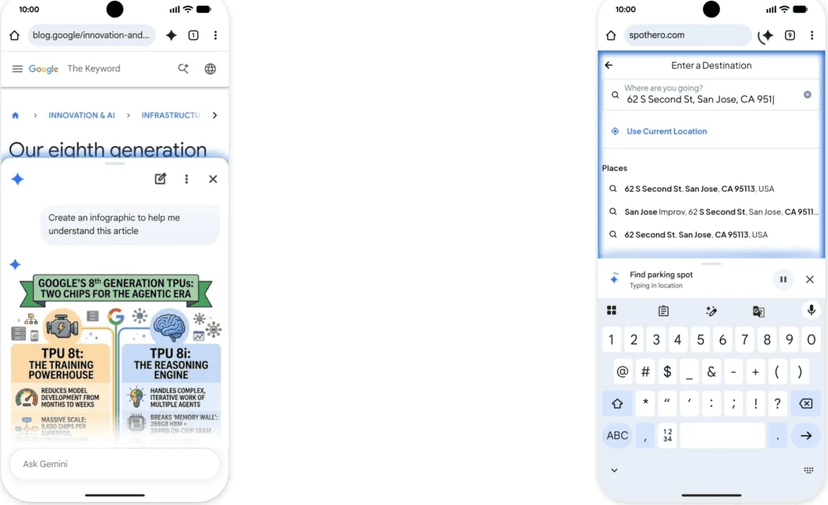
The feature set isn't surprising. Tap the Spark icon to the right of the address bar, or use the overflow menu, and Gemini slides up as a dockable sheet. Ask about the page you're on, summarize a long document, get a complex topic explained, all without leaving the app. The mobile interface is nearly identical to desktop.
The actual story is in the subscriber tier. Auto Browse. Available only to Google AI Pro and Ultra subscribers, it autonomously handles routine multi-step tasks — booking parking, updating recurring orders, organizing travel. That's the point where the browser stops being a thing that shows you pages and becomes a thing that operates pages for you.
And this shipped late. Google announced it in mid-May with a target of "rolling out in the US starting late June 2026." It arrived roughly a month and a half behind.
The Cast: Chrome, Gemini, and the Browser War Restarting
Chrome is the most-used browser in the world and effectively the default on Android. Half of why this rollout matters isn't the feature — it's the word Chrome. The number of people who install a separate app to use an AI assistant and the number who tap one icon in the browser they already use differ by orders of magnitude.
Gemini now spans Google's product surface: Search, Workspace, Android, and Chrome. On August 19 Gemini 3.7 Flash shipped aimed at coding agents. The company keeps widening deployment surfaces.
AI browsers like Perplexity's Comet and OpenAI's Atlas opened this market first. Their logic was sound: the browser sees a user's entire web activity, so it's the strongest place to put an AI. The problem is distribution. People almost never switch browsers. The moment Google puts Gemini into Chrome, the position those companies were trying to earn through persuasion arrives via an update.
Requirements are worth noting: Android 12 or later, 4GB of RAM or more, US region. Android 12 is a 2021 release, so devices approaching five years old qualify. The processing runs server-side rather than on device, which is presumably why the hardware bar sits so low.
What It Actually Does
| Capability | Access |
|---|---|
| Page summarization and Q&A | All users |
| Add current page as context (togglable in Settings) | All users |
| Nano Banana image editing integration | All users |
| Personal Intelligence (Calendar, Keep, and other app connections) | All users |
| Auto Browse (autonomous multi-step tasks) | AI Pro and Ultra subscribers |
Current-page context is a toggle in Settings. With it on, Gemini reads what you're viewing to answer. Offering the toggle matters for privacy; checking which way it defaults is on you.
Personal Intelligence connects Google apps like Calendar and Keep to the assistant, making "add this event to my calendar" possible from inside the browser. Because the data stays inside your Google account, there's no conspicuous OAuth consent flow — but the assistant touching personal data is no different in kind from a third-party connector.
Nano Banana integration handles image editing inside the browser, letting you adjust or transform an image you found on a page. That's a meaningful convenience for social and commerce users.
Auto Browse is the core of the release. Google's examples are booking parking, updating recurring orders, and organizing travel — all repetitive jobs that span multiple pages of input and confirmation. One safeguard ships with it: sensitive actions requiring purchases demand explicit user confirmation.
Don't skim past that. The largest risk when an agent operates the web on your behalf is payments and account changes, and Google forcing a human approval gate there is a deliberate design decision. Especially against the Copilot CoSnitch case the same week: a browser agent is by definition a system that reads externally sourced text and acts on it, which makes it a frontal target for prompt injection.
What the six-week slip tells you
Schedule slip is ordinary. Which feature slipped is the hint.
Google announced this in mid-May targeting late June. It shipped August 18. What got added in between is Auto Browse, and that feature differs fundamentally from summarization. Summarizing ends with reading and answering. Auto Browse takes real actions under your account. Get it wrong and there's residue — a booking made, an order placed, a form submitted.
Mobile compounds the difficulty. Desktop browser agents get wide screens and manageable DOM structures. Mobile web layouts vary wildly and frequently bounce into app deep links. Performing the same task reliably on mobile is substantially harder.
Reading the delay negatively isn't required. Shipping a feature that acts under user accounts carefully beats shipping it fast.
Who Gets What
Google gets habit. Browsers get opened dozens of times a day, and an assistant resident inside makes Gemini the default for "ask the AI." Several steps less friction than a competitor requiring a separate app launch.
It's also search defense. The worry that AI assistants replace search has followed Google for years. Putting the assistant inside the browser means that replacement doesn't happen outside Google. Search queries may fall; the user is still in Chrome.
AI Pro and Ultra subscriptions get substance. Auto Browse is a credible tier divider. Summarization and Q&A have plenty of free alternatives; something that operates your browser for you does not.
Users cut app switching. That matters most on mobile, where leaving and returning to an app breaks context in a way that switching desktop tabs doesn't. Staying inside the browser is a genuinely felt improvement.
Android manufacturers get an ambiguous outcome. For a company like Samsung positioning on-device AI as a differentiator, Google delivering the same experience at the Chrome layer across all Android devices erodes the differentiation argument. It does make the devices more attractive overall, which helps sales. Which effect dominates depends on how a manufacturer planned to monetize AI.
Publishers and site operators are on the other side. Users reading summaries instead of pages means fewer pageviews. Auto Browse filling forms and making bookings skips the ads and upsells that lived along that path. The traffic impact of AI search summaries is already contested; agents doing the browsing itself operates on a different scale.
Precedents: What Bundling Into a Browser Has Meant
Internet Explorer bundling in the 1990s is the archetype. Microsoft shipped IE inside Windows, pushed Netscape out, and drew a US antitrust suit. Two lessons: controlling distribution is overwhelmingly effective, and the more effective it is, the more regulation follows.
Google has already faced search antitrust proceedings where divesting Chrome was discussed. Planting Gemini in Chrome is a commercially natural sequence that touches exactly the sensitive point — using default browser position to gain in an adjacent market.
Chrome's own rise (2008-2015) is worth remembering too. It started as a faster browser, but what took the market was promotion through Google Search and Gmail plus Android bundling. Good product and strong distribution overlapped.
Google Assistant (2016-2023) is the counterexample. Bundled into Android, extended to home speakers, distribution overwhelming. Users mostly set timers and checked the weather. Distribution creates installs, not habits — Google proved that with its own product. Gemini in Chrome faces the same test. An icon being visible and people tapping it are different things.
And there's the browser extension history. Dozens of Chrome extensions offering page summarization shipped over the past two years, and few grew past a certain size. That may signal that demand for summarization alone is shallower than assumed. Google's judgment appears to be that something which actually does the work — Auto Browse — is what creates the difference.
Competitor Counterplay
Perplexity takes the most direct hit. Comet's position as an AI-first browser weakens when Chrome ships the same thing by default. Its response has to be doing what Chrome can't — search quality and source-attribution transparency are the likeliest candidates.
OpenAI is in the same market with Atlas plus the overwhelming brand recognition of the ChatGPT app. It faces the identical browser-switching friction, though. OpenAI's real advantage is that users already keep ChatGPT open, which may make operating the web from inside the app more natural than from inside a browser.
Microsoft Edge has had Copilot in the browser for years. Google's rollout is Edge's playbook at Chrome scale. Edge's share is the problem, and having a serious Copilot data-exfiltration flaw patched the same week is poor timing for Microsoft.
The browser extension ecosystem takes damage. Extensions selling summarization, translation, and autofill collide directly with browser-native features. Chrome extensions live or die by what Chrome ships by default, and more than a few teams will need to rebuild their business model after this.
Apple's Safari is quiet. With Apple Intelligence continuing to slip, the browser AI experience on iOS is delegated to third parties. But iOS forces Chrome onto WebKit, so whether Android-level integration transfers is a separate question.
What Actually Changes for You
If you're on Android in the US: update Chrome and look next to the address bar. A Spark icon means you have it. Free access covers summarization and Q&A; Auto Browse requires AI Pro or higher.
If you're outside the US: not yet. This rollout is US-only and Google hasn't named the next regions. Given the six-week slip on the US date, treat the expansion timeline generously.
If you run a website: start preparing. Check whether your page structure is machine-legible — clear heading hierarchy, structured data, accessibility labels. What's good for people is good for agents. Then watch your analytics for shifting session patterns. Pageviews falling while conversions hold could be the fingerprint of agent browsing.
If you run e-commerce: design on the assumption that some visitors aren't people. Auto Browse updating recurring orders means agents traversing your checkout flow. CAPTCHAs, bot blocking, and session validation that reject legitimate agent traffic cost you revenue; leaving everything open exposes you to abuse. Now is the time to think about how you'd verify "this agent is genuinely acting for this user."
If you work in security: browser agents are the front line for prompt injection. An agent reading web pages and acting on their contents means a malicious page can issue it instructions. Google forcing user confirmation on purchases signals awareness of the risk, but purchases aren't the only dangerous action. Form submission, account setting changes, and file downloads belong in the same category.
If you build AI products: the lesson is distribution. Google didn't build a new model or a new interface. It added one button to an app billions of people already use. Even when an AI startup leads on features, closing that gap is extremely hard — which means any AI product without a distribution path needs that problem in the design from day one.
🥄 Three Things You're Probably Wondering
— When does it reach my country? Google hasn't said. Given that the US rollout itself came six weeks after the announced date, other regions can't be predicted confidently. Keeping Chrome updated is about all you can do.
— Auto Browse really makes bookings? Google's examples are booking parking, updating recurring orders, and organizing travel. It handles multi-step web tasks and demands user confirmation at purchase steps. How reliable these agents are in the wild has no data yet. Watching carefully for the first few months is the right posture.
— What happens to websites? Too early to say. The debate over AI search summaries reducing traffic isn't settled, and agent browsing could hit harder — especially for ad-supported sites. But this is an early rollout to US Android users only, so meaningful impact takes time to appear.
References
- 9to5Google — Gemini in Chrome and auto browse roll out on Android in the US (2026-08-18)
- Android Authority — Gemini in Chrome rolls out to Android users in the US
- Chrome Unboxed — Gemini in Chrome for Android is rolling out to everyone with a wild new 'Auto Browse' tool
- Jetstream — Android 'Gemini in Chrome' Rolling Out in the US, Six Weeks Late
- PiunikaWeb — Gemini in Chrome for Android is now official and rolling out widely in the US (2026-08-19)
- AndroidPure — Gemini in Chrome Is Now Live for All US Android Users
Numbers and criteria are as of announcement and may change.